Fact-checked by the MyFinancial101 editorial team
Quick Answer
Digital couponing lets you save money through store apps, rebate platforms, and browser extensions without clipping paper. An estimated 169.2 million Americans redeemed digital coupons in 2025, and digital now accounts for 53.4% of all coupons redeemed in the U.S. Beginners should start with one store app, clip 5–10 relevant offers, and add a rebate app like Ibotta or Fetch.
Most people assume couponing requires a binder, scissors, and two free hours on Sunday. That assumption is outdated. Digital couponing for beginners starts with downloading an app you already use, tapping a few offers, and scanning your receipt at checkout, no paper required. According to Capital One Shopping’s 2025 coupon research, digital coupons made up 53.4% of all coupons redeemed in 2024, overtaking traditional print for the first time.
The shift matters because the tools have caught up to the habit. Store loyalty apps, receipt-scanning rebate platforms, and browser extensions now handle the organization automatically. This guide covers where to start, which apps deliver real savings, how to stack offers without violating store policies, and the honest limitations you should know before you begin.
Key Takeaways
- 169.2 million American consumers redeemed digital coupons in 2025, signaling mainstream adoption, not a niche habit (Capital One Shopping, 2025).
- Digital coupon redemptions reached 465.5 million in 2024, a 10.8% jump from 420.2 million in 2023 (Capital One Shopping, 2024).
- 82% of consumers redeem a digital coupon within one week of receiving it, and 30% use it the same day (Snipp, 2024).
- 54% of consumers have completed a purchase based on a mobile wallet offer, and 52% now store coupons in mobile wallets (Snipp, 2024).
- The U.S. digital coupon market is valued at $10.6 billion and is projected to grow by an additional $2 billion by the end of 2026, making app infrastructure investments by retailers likely to continue.
In This Guide
What Is Digital Couponing and Why Switch from Paper?
Digital couponing is the practice of saving money through app-based offers, browser extensions, and receipt-scanning rebate platforms rather than physically clipping printed coupons. The core difference from traditional couponing: the coupon lives on your phone or computer, not in a binder. You “clip” it with a tap, and it applies automatically at checkout through a loyalty account or barcode scan.
The numbers tell the directional story. According to Capital One Shopping’s 2024 coupon data, the U.S. distributed 67.2 billion coupons in 2024, of which 17.8 billion were digital. That is a significant slice, and the redemption rate for digital far outpaces print. Digital coupons accounted for 53.4% of all coupons redeemed, while traditional printed sources accounted for just 40.8%.
The Practical Case for Going Digital
Paper coupons expire in your junk drawer. Digital coupons expire too, but apps surface that deadline for you. Store apps from retailers like Kroger, Walgreens, Target, and CVS now automatically match clipped offers to your cart before you pay. There is no fumbling at the register, no cashier sighing while you locate the right insert. For anyone who tried paper couponing once and gave up, the frictionless entry point of a store app is the most meaningful practical improvement.
The market growth also signals where retailer investment is flowing. A $10.6 billion digital coupon market with $2 billion in projected additional growth by end of 2026 means stores are continuously improving their app experiences to attract and retain loyalty members. That competition between retailers benefits the consumer.
Digital coupons surpassed print in redemption share for the first time in 2024, claiming 53.4% of all redeemed coupons in the U.S. Print held that majority position for decades.
Getting Started Without the Overwhelm
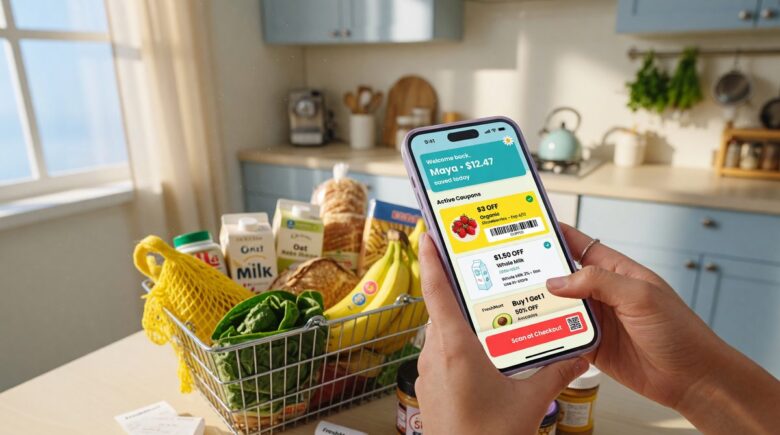
The single biggest reason new coupon users quit is trying to do too much at once. Pick one store you already shop at regularly. Download its app, create a free loyalty account, and spend ten minutes clipping five to ten relevant offers before your next trip. That is the entire first step.
“Yes, there are tons of ways to stack coupons, combine offers, and get stuff for basically free. But for your first couple of outings, if you’re not paying full price, you’ve won.”
McGrath’s point is worth taking seriously. The advanced techniques, stacking, doubling, combining manufacturer and store offers, come after you are comfortable with the basic workflow. Start narrow. Expand once the habit is automatic.
Essential Apps and Tools for Beginners
Four categories of tools cover nearly every digital couponing need: store loyalty apps, rebate apps, coupon databases, and browser extensions. Most beginners only need two.
Store Apps and Loyalty Programs
The highest-reliability tools for beginners are the retailer’s own apps. Target Circle, Kroger‘s app, CVS ExtraCare, and Walgreens myWalgreens all offer in-app coupon clipping tied directly to your loyalty number. No printer, no barcode scanning. You clip an offer, enter your phone number or scan your app at checkout, and the discount applies. These apps also push personalized deals based on your purchase history, which is efficient but carries a trade-off covered below.
Before downloading a paid newspaper subscription for coupons, check free coupon databases first. As personal finance blogger Tai McNeely advises:
“Before you sign up for newspaper subscriptions, check online sites such as Coupons.com, RedPlum.com, and SmartSource.com to print coupons.”
Rebate Apps: Ibotta and Fetch
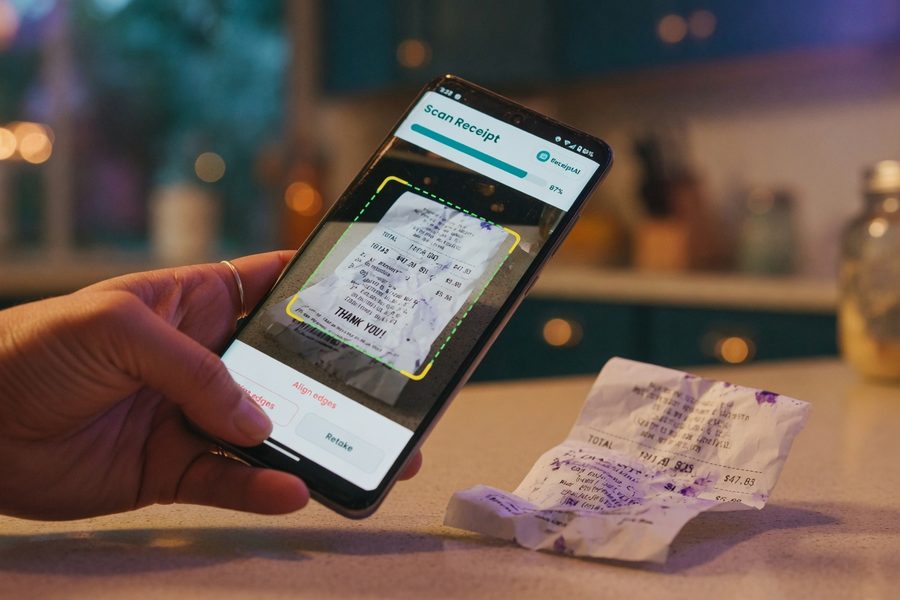
Ibotta and Fetch Rewards work differently from store apps. They are post-purchase rebate platforms: you shop, scan your receipt, and earn cash back or points. Ibotta links specific product offers to your account before shopping. Fetch allows you to earn points on almost any receipt scan, not just targeted products, which makes it one of the lowest-effort entry points in digital couponing. Neither requires a store-specific loyalty account, so they work across many retailers simultaneously.
For online shopping, browser extensions like Honey (owned by PayPal) and Capital One Shopping automatically test coupon codes at checkout. They require no manual searching and are genuinely passive once installed. Honey also offers a Honey Gold rewards program with cash-back rates on selected merchants.
Pair a store loyalty app with one rebate app like Fetch for your first month. This covers in-store discounts and post-purchase cash back with minimal account management. Add a browser extension only when you are shopping online regularly.
How to Clip, Stack, and Redeem Digital Coupons
Clipping a digital coupon takes three taps: open the store app, find the offer, tap “clip” or “add to card.” At checkout, entering your loyalty phone number or scanning your app barcode automatically applies every clipped discount to qualifying items. No separate coupon screen required.
Stacking: What Is Actually Allowed
Stacking means applying more than one discount to the same item. The most common legal stack for beginners: a store coupon (from the retailer’s own app) applied on top of a manufacturer coupon (from a site like Coupons.com or Ibotta). Most major retailers permit this combination because the two discounts come from different sources. What stores generally prohibit: using two store coupons on one item, or two manufacturer coupons on one item.
Adding a cash-back credit card on top of a stacked coupon is another layer entirely and does not violate any retailer policy. If a card like the Blue Cash Preferred from American Express returns 6% on U.S. supermarket purchases, and you have already reduced your item’s price with a stacked coupon, the 6% applies to the reduced price. The compounding is modest but real. If you carry credit card debt, however, those rewards are not worth the interest, a point covered in more detail in our guide to prioritizing and negotiating credit card debt.
Instant Discounts vs. Post-Purchase Rebates
Store app coupons are instant: the price drops at the register. Rebate apps like Ibotta and Fetch pay out after receipt submission, with processing times ranging from a few minutes to 48 hours. Ibotta pays in cash via PayPal or Venmo once you hit a $20 minimum. Fetch converts points to gift cards. Neither is better than the other; they work best together.
| Tool Type | When Savings Apply | Typical Savings Range | Best For |
|---|---|---|---|
| Store Loyalty App | Instantly at checkout | $0.25–$5.00 per item | Weekly grocery runs |
| Manufacturer Coupon (Coupons.com) | Instantly at checkout | $0.50–$2.00 per item | Brand-specific purchases |
| Ibotta | After receipt scan (minutes–48 hrs) | $0.25–$3.00 per item | Grocery and drugstore staples |
| Fetch Rewards | After receipt scan (minutes) | Points (~$0.10–$0.50 avg per receipt) | Any retail purchase, low effort |
| Browser Extension (Honey) | Auto-applied at online checkout | 2%–15% on select retailers | E-commerce and online orders |
Shopping Strategies for In-Store and Online Savings
Matching coupons to your existing shopping list, not building a list around available coupons, is the discipline that separates sustainable savers from people who overspend chasing deals. The workflow is simple: check your store’s weekly ad first, note what you already need, then open the app and clip offers for those specific items.
Personalized Offers and Their Limits
Store apps increasingly surface personalized offers based on your purchase history. Target Circle and Kroger both use purchase data to send deals on products you buy often. These are genuinely useful. The trade-off: location-based and personalized offers are not distributed equally across all users. A deal your friend receives through the Kroger app may not appear in yours, and these offers can change weekly without warning. Checking your app within 48 hours of shopping catches a higher percentage of current personalized deals because, as Snipp’s 2024 data shows, 82% of digital coupons are redeemed within one week of receipt.
There is also a data-privacy dimension here that most beginner guides skip. Scanning receipts through Ibotta or Fetch, linking multiple loyalty accounts, and installing browser extensions all involve sharing purchase data with third parties. Each app’s privacy policy governs how that data is used, shared, or sold. Reading those policies is tedious, but understanding that your shopping behavior is the product being exchanged for the discount is a reasonable baseline expectation.
For families stretching a tight grocery budget, digital coupons are one tool within a broader strategy. Our roundup of winter foods that keep grocery bills under control covers complementary tactics that work alongside coupon savings.
54% of consumers have made a purchase based on a mobile wallet offer, and 52% now store coupons in mobile wallets, confirming that the infrastructure for digital couponing is already in most shoppers’ hands (Snipp, 2024).
A Quick Worked Example
Say you spend $150 per week on groceries. A 10% average reduction through a combination of store app coupons and Ibotta rebates saves $15 per week. Over 52 weeks, that is $780 per year from one store and one rebate app. Bump that savings rate to 15%, achievable once you are comfortable stacking a manufacturer coupon with store offers on higher-cost items, and the annual figure reaches $1,170. Neither number requires extreme couponing; both are consistent with what beginners report after four to six weeks of practice.
Common Mistakes and Realistic Expectations
Buying something you would not have purchased otherwise is the defining failure mode of beginner couponing. A $4 item discounted to $2 is not a savings if you never needed it. The deal is only real if the item was already on your list or is a true staple you will use.
Expiration Dates and Fine Print
Digital coupons expire, and app notifications are not always reliable reminders. Build a habit of checking your clipped offers before each shopping trip. Most store apps show expiration dates clearly, but manufacturer coupons from third-party databases often have tighter windows, sometimes as short as seven days. Offers also frequently carry qualifying limits: “limit one per transaction” or “must buy two to save.” Missing that fine print means the discount will not apply at checkout.
Equally, do not default to coupons over store-brand generics. A manufacturer coupon reducing a branded item from $4.50 to $3.75 often still costs more than a store-brand equivalent at $2.99. Check unit prices, not just the discounted headline price.
For shoppers managing household finances under tight constraints, including those receiving assistance through programs like SNAP, our article on SNAP benefits and current federal budget pressures is worth reading alongside any savings strategy you develop.
Experienced coupon stackers sometimes layer store loyalty discounts, manufacturer coupons, and cash-back credit card rewards on a single purchase. Our deep dive on how coupon stackers are beating inflation breaks down exactly how that works.
Setting a Realistic Savings Target
Beginners should not expect to cut their grocery bill in half. The research-supported range for consistent digital couponing sits between 7% and 20% savings, depending on store, shopping habits, and how actively you stack offers. Tai McNeely frames the beginner benchmark this way:
“Couponing can be very overwhelming, but it doesn’t have to be. If you save 10–20% off your bill, that’s great!”
That 10–20% range is defensible for beginners using one store app plus one rebate app without advanced stacking. It is also sustainable without consuming hours of your week. For anyone balancing a budget that already feels stretched, even that modest range adds up, and the incremental gains combine well with other cost-reduction approaches. If you are also tracking expenses and looking to put those savings to work, our guide on how to start investing with zero experience covers exactly where to go next.
Frequently Asked Questions
Do digital coupons actually save meaningful money for beginners?
Yes, but the savings are incremental, not dramatic, at the start. Beginners using a single store loyalty app and one rebate app typically save 10–20% per shopping trip. On a $150 weekly grocery budget, that range equals $780 to $1,560 per year without advanced stacking techniques.
Are rebate apps like Ibotta and Fetch free to use?
Both Ibotta and Fetch are free to download and use. They earn revenue from brands that pay for promotion within the apps, not from consumers. Ibotta requires a $20 minimum before cashing out; Fetch converts points to gift cards with no stated minimum redemption amount.
Is it safe to scan receipts and link loyalty accounts across multiple apps?
The apps are legitimate, but the trade-off is real: your purchase data is shared with the app provider and, in many cases, with their brand partners. Every receipt scan and loyalty account link adds a layer of data exposure. Reviewing each app’s privacy policy before signing up is the reasonable precaution most guides omit entirely.
Can you stack digital coupons with a cash-back credit card?
Stacking a digital coupon with a cash-back credit card reward is permitted by virtually all retailers, they are independent discount systems. The cash-back percentage applies to the post-coupon price, so the absolute dollar reward is slightly smaller, but no store policy prevents the combination.
How many apps should a beginner use at once?
Start with two: one store loyalty app for your primary grocery or drugstore, and one rebate app (Fetch for low effort, Ibotta for higher item-specific returns). Add a browser extension like Honey once online shopping is a regular habit. Managing more than three or four active platforms simultaneously creates diminishing returns relative to the time invested.
Sources
- Capital One Shopping, Coupon Statistics (2024–2025)
- Snipp, Digital Coupon Marketing Strategies and Trends (2024)
- ABC15, Couponing for Beginners: Expert Savers Break Down What to Know
- The Frugal Feminista, Couponing Tips for Beginners: Start Slow and Steady
- Forbes Advisor, How to Save Money on Groceries